
 Join our Discord
Version 2.1.0 · QBCore and ESX (auto-detected) · drop-in replacement for qb-spawn
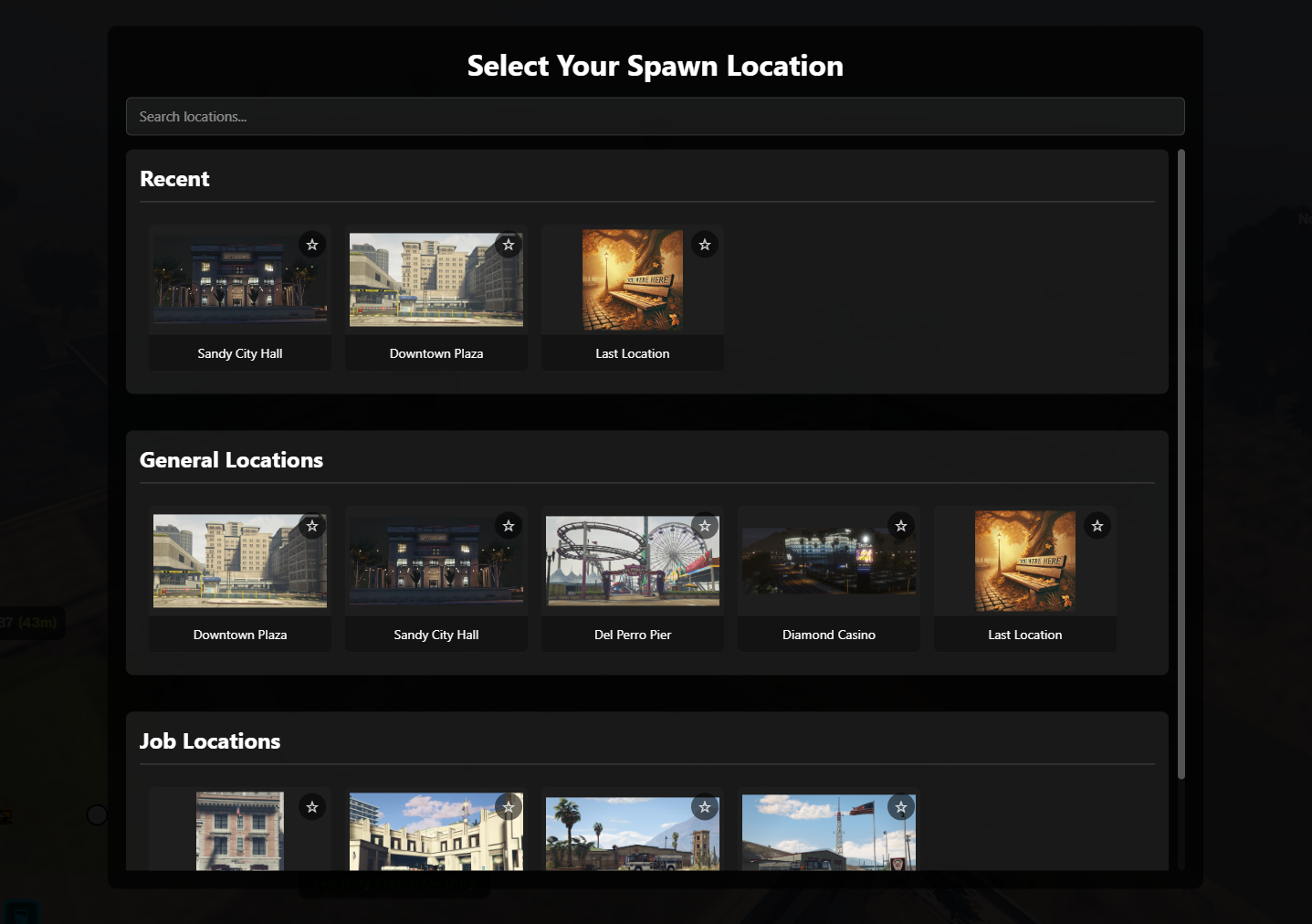
The spawn screen is the first thing every player sees, every session. This one gives them a preview camera on each location, shows only the spawns they are allowed to use, and lets your admins add and move spawns from inside the game instead of editing a config file and restarting.
What players get
- Location previews – a camera flies to each spawn as they browse, with a live screenshot behind the menu.
- Last location – pick up where they left off, with a preview image of the spot.
- Job spawns – police see stations, EMS see the hospital, mechanics see the shop. Everyone else never sees them.
- Their properties – owned houses appear as spawn options (loaf_housing out of the box).
- Favorites and recents – star a spawn, and the last few used sit in their own row.
- Search – a live filter box for servers with long spawn lists.
- Correct character on screen – appearance loads through illenium-appearance before the menu opens, so no default model or clothing flicker.
- No falling through floors – ground detection with special handling for interiors.
- Dark or light theme, chosen by the server.
What admins get: the in-game editor
Run /spawnedit (permission checked server-side) to open a full editor without leaving the game:
- Add, edit, reorder, duplicate and delete spawns.
- Free-cam placement – fly to a spot, press one key to drop the spawn point on the ground and another to frame the preview camera. No guessing coordinates.
- Tile image capture – screenshot the current view straight into the menu tile (needs screenshot-basic).
- Access rules per spawn – gate any location behind job, minimum grade, gang, license, item or citizen ID.
- Settings tab – theme, search, features, favorites, on-spawn stats and last-location rules, pushed to connected players on save.
- Export as Lua to make in-game changes permanent, or Reset to config.lua to throw them all away.
The editor never rewrites config.lua. It saves to a separate overrides file that is layered on top at start, so your comments survive and a delete puts you back exactly where you began.
Built for a live server
- Server-authoritative – the client sends a spawn id; the server validates it against that player's allowed list and applies the coordinates, health, hunger and thirst itself. Restricted spawns are never sent to players who cannot use them.
- Last-location anti-abuse – hide it while the player is dead or in last stand, and optionally for a cooldown after combat.
- Brief spawn invincibility to stop spawn deaths, configurable in length.
- Config validation on start warns about missing images and malformed coordinates before a player ever sees them.
- Localized – every player-facing string lives in a locale file. Ships with English; add your own.
- No hard dependencies – screenshot-basic, loaf_housing and illenium-appearance are all optional and detected at runtime.
Customize without touching the core
The core is escrowed. Everything a server owner reasonably needs to change is in open files that survive updates: config, locales, the framework bridge, the editor, the entire HTML/CSS/JS interface, and dedicated client and server customization files with documented hooks for housing systems, permissions, post-spawn logic and appearance loading.
Commands
- /spawnedit – open the in-game spawn editor. Default permission: god.
- /sals_testspawn – open the spawn selector on demand. Default permission: god.
Both command names and permission levels are configurable.
Installation
- Drop sals_kewlspawnselector into your resources folder.
- Add ensure sals_kewlspawnselector to server.cfg after your framework.
- Remove or comment out ensure qb-spawn. This resource provides it.
- Edit config.lua, or start the server and use /spawnedit.
Documentation and support
- Owner's manual: salskewlkorner.com/documentation/sals-kewl-spawn-selector.html
- The same manual ships in the download as docs/help.html.
- Support: discord.gg/CVWZb6AEwy
Recent changes
2.1.0 – In-game spawn editor with free-cam placement, tile image capture, per-spawn access rule editing, settings tab, Export as Lua and Reset. Server-side re-validation of everything the editor sends, with save and upload rate limits.
2.0.0 – Framework bridge for QBCore and ESX. Server-authoritative spawning. Per-spawn access rules. Favorites, recents and search. Last-location anti-abuse. Localization. Config validation on start. Removed exploitable net events from 1.x. Config field names changed; see the manual.